
Apple Vision Pro & Spatial Interfaces: Eye-Tracking, Hand Gestures & visionOS Architecture
For four decades, graphical user interfaces were anchored to rigid two-dimensional rectangles: Xerox PARC's desktop windows, Apple's Macintosh raster canvas, and smartphone capacitive touchscreens. In 2024, the commercial debut of the Apple Vision Pro redefined human-computer interaction by abandoning physical controllers entirely in favor of an invisible, high-precision multimodal interface: look and pinch.
Achieving intuitive, lag-free spatial computing requires solving severe physics and perceptual physiology challenges. The human vestibular system experiences debilitating nausea (simulator sickness) if the delay between physical head rotation and photon emission exceeds 15–20 milliseconds. Furthermore, rasterizing 23 million pixels across twin 4K Micro-OLED displays at 90–96 Hz would melt any mobile GPU without aggressive foveated optimization. In this engineering deep dive, we deconstruct the dual-silicon M2/R1 architecture, corneal glint gaze math, foveated shader pipelines, and hand tracking kinematics that power spatial computing.
System Architecture: Apple Vision Pro Dual-Silicon Processing Pipeline
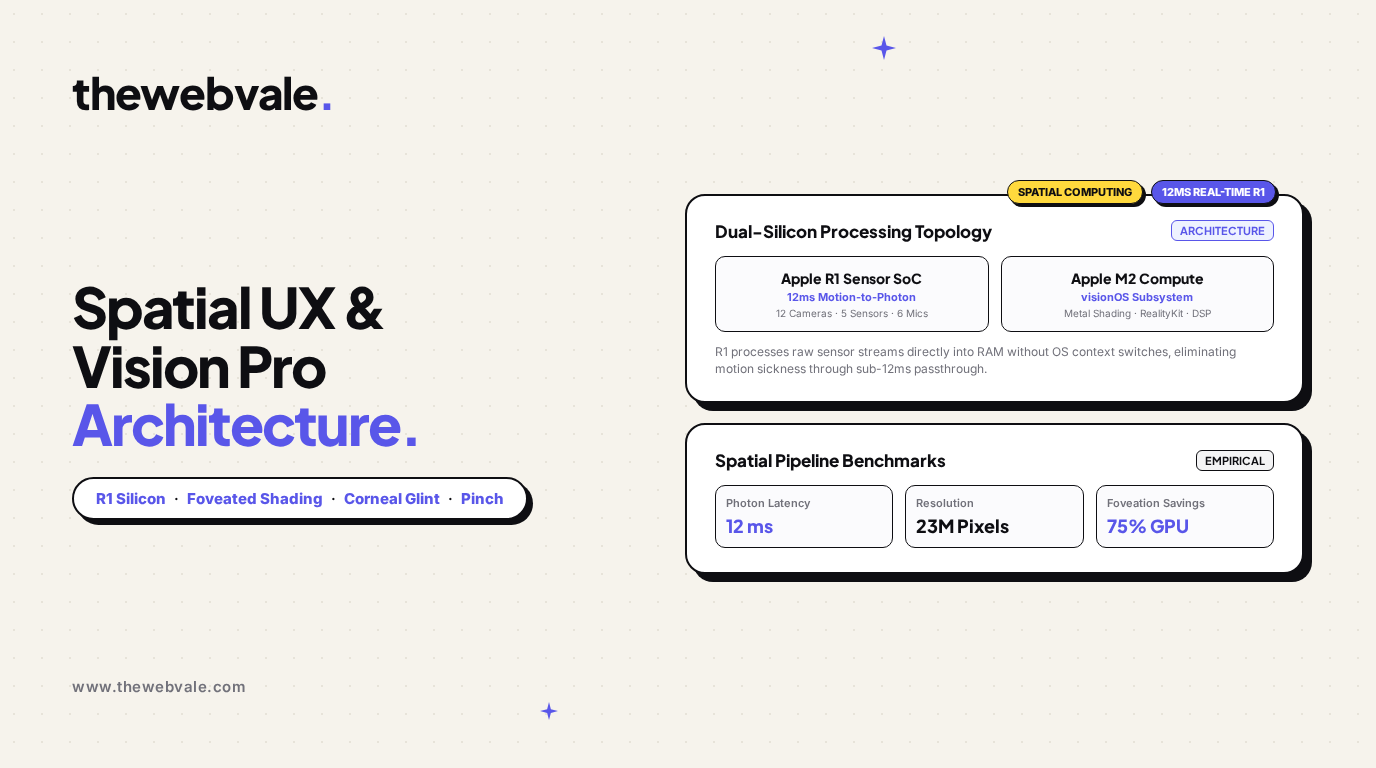
Dataflow partitioning between the deterministic 12ms R1 sensor coprocessor and the M2 visionOS compute engine.
1. The Dual-Silicon Partition: Eliminating Motion-to-Photon Sickness
The core innovation of the Apple Vision Pro is its heterogeneous dual-chip compute architecture. In traditional headsets (such as Meta Quest 3), a single SoC handles video decoding, application logic, physics simulation, camera processing, and display composition. If an app undergoes a garbage collection pause or drops frames under heavy load, the passthrough video freezes or stutters, inducing immediate vestibular mismatch.
Apple solved this by physically bifurcating the processing pipeline:
- Apple M2 (Mac-Class Compute): Runs visionOS, executes application bytecode, coordinates high-level UI window hierarchies, and runs the 16-core Neural Engine for local foundation models.
- Apple R1 (Dedicated Real-Time Sensor Coprocessor): A custom ASIC designed strictly to ingest data from 12 cameras, 5 sensors (including LiDAR and TrueDepth), and 6 microphones. The R1 streams real-time stereoscopic passthrough video to the Micro-OLED displays in exactly 12 milliseconds—eight times faster than the blink of an eye—regardless of what workload the M2 is executing.
2. Corneal Glint Gaze Estimation & Foveated Shading Mathematics
To enable seamless gaze interaction without bulky depth sensors, the Vision Pro uses PCCR (Pupil Center Corneal Reflection). A ring of near-infrared (NIR) LEDs surrounds each lens, projecting invisible glint reflections onto the user's spherical cornea:
Corneal Reflection Gaze Vector Formulation:
vgaze = R · [ (cpupil - ccornea) / || cpupil - ccornea || ]
Where ccornea is computed from the geometric centroid of the infrared corneal glints, cpupil is the ellipse center of the detected pupil, and R is the user-calibrated eyeball rotational transformation matrix.
Once the gaze ray (xgaze, ygaze) is resolved at 90 Hz, the graphics pipeline executes Dynamic Foveated Rendering via Metal 3 Variable-Rate Shading (VRS). The human eye has high visual acuity only in the central fovea centralis (approximately 1.5°–2° of central field of view), while peripheral rod cells cannot resolve high-frequency geometric detail.
Retinal Eccentricity Shading Density:
ρ(θ) = ρ0 / [ 1 + (θ / θ0)α ]
Where θ is the visual angular distance from the gaze center. For θ < 5°, pixels are shaded at 100% native 4K resolution. For 5° ≤ θ ≤ 15°, resolution drops to 50% (2x2 pixel blocks). Beyond 15°, shading drops to 25% (4x4 blocks), slashing overall pixel shader workload by 75% while remaining completely imperceptible to the observer.
3. Hand Tracking Kinematics & Micro-Pinch State Machine
Rather than requiring the user to hold their hands up in front of their face (the infamous "gorilla arm" fatigue of first-generation AR), the Vision Pro uses downward-angled ultra-wide cameras to track hand skeletons resting naturally in the user's lap.
The system extracts 25 skeletal joints per hand at 60 Hz. The primary activation primitive—the Micro-Pinch—is governed by a deterministic hysteresis finite state machine:
- Hover State: Gaze vector intersects an interactive UI bounding box (triggering subtle glow and specular highlight).
- Pre-Pinch State: Distance between index finger tip pindex and thumb tip pthumb drops below 25 mm: || pindex - pthumb || < δpre.
- Down Event (Pinch Actuated): Distance drops below contact threshold: || pindex - pthumb || ≤ 8 mm with positive closing velocity.
- Up Event (Release): Distance exceeds release threshold δrelease = 16 mm, triggering click execution.
4. Production Implementation: Corneal Glint Gaze & Micro-Pinch Classifier
Below is a runnable Python production module modeling the mathematical transformation from corneal infrared glints to spatial gaze coordinates, combined with an optical micro-pinch gesture detection state machine:
# Real-Time Spatial Gaze Ray & Micro-Pinch Gesture Detection Pipeline
# visionOS Optical Tracking Emulation

import numpy as np
from dataclasses import dataclass
from enum import Enum
from typing import Tuple, Optional, List

class PinchState(Enum):
    HOVER = "HOVER"
    PRE_PINCH = "PRE_PINCH"
    PINCH_ACTIVE = "PINCH_ACTIVE"

@dataclass
class EyeTrackingObservation:
    pupil_center: np.ndarray       # 2D pixel coordinates (x, y)
    corneal_glints: List[np.ndarray] # Array of 4 infrared glint reflections
    timestamp: float

class SpatialGazeTracker:
    def __init__(self, display_res: Tuple[int, int] = (3840, 2160)):
        self.res_x, self.res_y = display_res
        # Affine calibration matrix mapping glint-pupil offset to screen coordinates
        self.calib_matrix = np.array([
            [120.0, 0.0],
            [0.0, 115.0]
        ])
        self.screen_center = np.array([display_res[0] / 2.0, display_res[1] / 2.0])

    def estimate_gaze_pixel(self, obs: EyeTrackingObservation) -> np.ndarray:
        # 1. Compute corneal geometric centroid
        glints_array = np.array(obs.corneal_glints)
        cornea_center = np.mean(glints_array, axis=0)

        # 2. Pupil-Center-Corneal-Reflection (PCCR) offset vector
        pccr_offset = obs.pupil_center - cornea_center

        # 3. Project into 3D spatial screen coordinates
        screen_coord = self.screen_center + (self.calib_matrix @ pccr_offset)

        # Clamp to physical display bounds
        screen_coord[0] = np.clip(screen_coord[0], 0, self.res_x)
        screen_coord[1] = np.clip(screen_coord[1], 0, self.res_y)
        return screen_coord

class MicroPinchDetector:
    def __init__(
        self,
        pinch_contact_dist_mm: float = 8.0,
        pinch_release_dist_mm: float = 16.0
    ):
        self.contact_threshold = pinch_contact_dist_mm
        self.release_threshold = pinch_release_dist_mm
        self.state = PinchState.HOVER
        self.last_distance = 50.0

    def evaluate_hand_joints(
        self,
        thumb_tip: np.ndarray,
        index_tip: np.ndarray,
        dt: float = 0.011 # ~90 Hz sample cycle
    ) -> Tuple[PinchState, bool]:
        # 3D Euclidean distance between thumb and index fingertips (in mm)
        dist_mm = float(np.linalg.norm(thumb_tip - index_tip))
        velocity = (dist_mm - self.last_distance) / dt
        self.last_distance = dist_mm

        click_triggered = False

        # Hysteresis state machine
        if self.state == PinchState.HOVER:
            if dist_mm < 25.0:
                self.state = PinchState.PRE_PINCH
        elif self.state == PinchState.PRE_PINCH:
            if dist_mm <= self.contact_threshold and velocity < 0:
                self.state = PinchState.PINCH_ACTIVE
                click_triggered = True
            elif dist_mm > 30.0:
                self.state = PinchState.HOVER
        elif self.state == PinchState.PINCH_ACTIVE:
            if dist_mm > self.release_threshold:
                self.state = PinchState.HOVER

        return self.state, click_triggered

# Demonstration
if __name__ == "__main__":
    gaze_tracker = SpatialGazeTracker()
    pinch_detector = MicroPinchDetector()

    # 1. Simulate Eye Gaze Gaze Query
    sim_obs = EyeTrackingObservation(
        pupil_center=np.array([245.2, 198.4]),
        corneal_glints=[
            np.array([242.0, 195.0]), np.array([248.0, 195.0]),
            np.array([242.0, 201.0]), np.array([248.0, 201.0])
        ],
        timestamp=0.0
    )
    gaze_px = gaze_tracker.estimate_gaze_pixel(sim_obs)
    print("--- Apple Vision Pro Spatial Tracking Simulation ---")
    print(f"Target Gaze Intersection: X={gaze_px[0]:.1f}px, Y={gaze_px[1]:.1f}px (4K Micro-OLED)")

    # 2. Simulate User Pinch Gesture
    print("
Simulating Optical Micro-Pinch Gesture Sequence:")
    thumb = np.array([0.0, 0.0, 0.0])
    for step, dist in enumerate([35.0, 22.0, 12.0, 6.0, 5.0, 18.0]):
        index = np.array([dist, 0.0, 0.0])
        state, clicked = pinch_detector.evaluate_hand_joints(thumb, index)
        event_str = " -> CLICK EVENT FIRED!" if clicked else ""
        print(f"Frame {step+1}: Distance={dist:4.1f}mm | State={state.value}{event_str}")
5. Summary & Spatial Interface Paradigms
The true breakthrough of the Apple Vision Pro is not merely display pixel density, but the architectural harmony of its input modalities. By offloading sensor fusion to the dedicated 12ms R1 coprocessor, calculating corneal gaze vectors before user cognition completes, and replacing clumsy handheld plastic wands with passive micro-pinches, Apple established the foundational operating paradigm for the next generation of spatial computing.