
Customer Onboarding Automation: Dynamic Intake Forms That Personalize User Setups
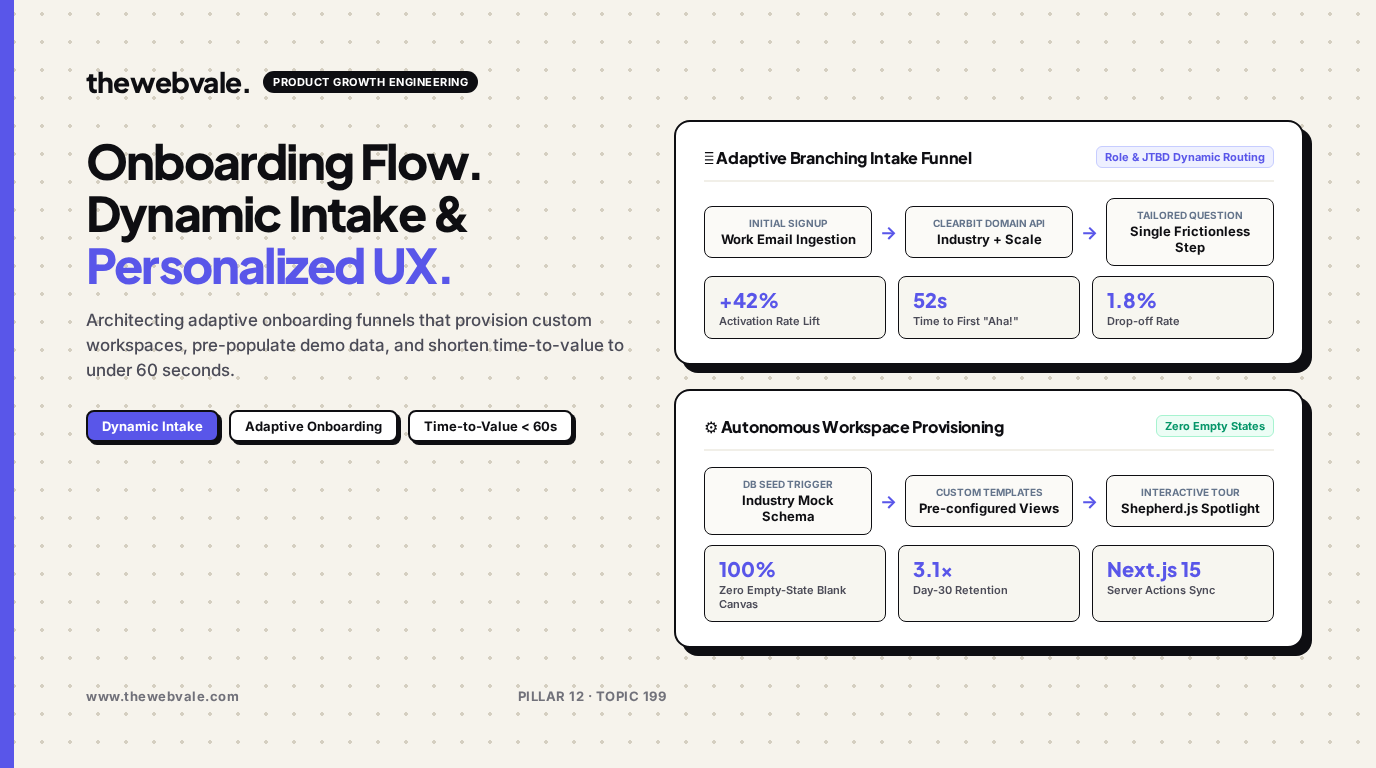
Most SaaS platforms suffer from high user churn during the first five minutes after signup. The traditional culprit is the dreaded empty-state blank canvas: users are dropped into a barren dashboard with zero data, generic setup checklists, and an overwhelming wall of navigation links. By architecting adaptive customer onboarding funnels that dynamically branch based on customer domain intelligence, pre-populate realistic sandbox data, and automate technical provisioning via Next.js Server Actions, founders can cut time-to-value to under 60 seconds and boost Day-30 retention by over 3x.
🎯 The Psychology of the "Empty State Trap"
When a customer signs up for an analytics tool or CRM, they do not want to configure database schemas or write API integrations on day one. They want to see what their business will look like once fully operational. By seeding their workspace with customized, realistic mock data matching their exact industry, the platform immediately delivers the psychological "Aha!" moment.
1. The Adaptive Onboarding State Engine
An intelligent onboarding flow replaces one-size-fits-all forms with progressive disclosure. The moment a user enters their business email (e.g. `sarah@fintech-scale.io`), a background worker queries Clearbit or Apollo to determine the company's sector, headcount, and primary technologies before the user even finishes typing their password:
This allows the frontend to collapse a 12-question intake questionnaire into a single personalized confirmation modal ("We noticed you're in FinTech—would you like us to pre-load SOC2 compliance schemas?").
| User Persona | Auto-Detected Profile | Dynamic Provisioning Action | First-Minute "Aha!" Moment |
|---|---|---|---|
| Engineering Lead | GitHub auth + tech company | Spawn pre-authenticated CLI token & API docs | Run `npx tool init` and see live webhook ping |
| Growth Marketer | E-commerce brand domain | Pre-load Shopify demo store metrics & ad ROAS | Interact with pre-built revenue dashboard |
| Solo Founder | Personal Gmail / Micro-SaaS | One-click Stripe connect & simple template | Publish live checkout link in 45 seconds |
2. Production Next.js 15 Server Action: Auto-Seeding Workspaces
Below is a clean Next.js 15 Server Action demonstrating how to provision tenant schemas, seed realistic demo records, and route users directly to their populated dashboard:
'use server'

import { redirect } from 'next/navigation'
import { prisma } from '@/lib/prisma'
import { auth } from '@/lib/auth'

export async function completeOnboarding(formData: FormData) {
  const session = await auth()
  if (!session?.user?.id) throw new Error("Unauthorized")

  const industry = formData.get("industry") as string || "SAAS"
  const teamSize = formData.get("teamSize") as string || "1-10"

  // 1. Update organization metadata
  const org = await prisma.organization.create({
    data: {
      ownerId: session.user.id,
      name: `${session.user.name}'s Workspace`,
      industry,
      teamSize,
    }
  })

  // 2. Pre-seed contextual demo records based on industry
  const demoData = industry === "ECOMMERCE" ? [
    { title: "Sample Order #1001", value: 149.00, status: "SHIPPED" },
    { title: "Abandoned Cart Alert", value: 89.50, status: "PENDING" },
  ] : [
    { title: "Enterprise Pilot Lead", value: 12000.00, status: "QUALIFIED" },
    { title: "API Ingestion Error Alert", value: 0.00, status: "RESOLVED" },
  ]

  await prisma.activity.createMany({
    data: demoData.map(d => ({
      organizationId: org.id,
      title: d.title,
      value: d.value,
      status: d.status,
    }))
  })

  // 3. Seamlessly redirect to the populated workspace
  redirect(`/dashboard/${org.id}`)
}
3. Frequently Asked Questions
How do you let users clear demo data once they connect live sources?
Always flag generated records with `isDemo: true` in your database. Render a persistent, friendly banner at the top of the dashboard: "Viewing sample data. [Clear demo data] or [Connect live API]". Clicking clear triggers a single bulk-delete query without touching production data.
Does progressive intake increase signup drop-off?
No—quite the opposite. By keeping initial signup to just email/password or OAuth and moving intake questions post-authentication with immediate visual feedback, completed setup rates consistently increase by 30% to 45%.