
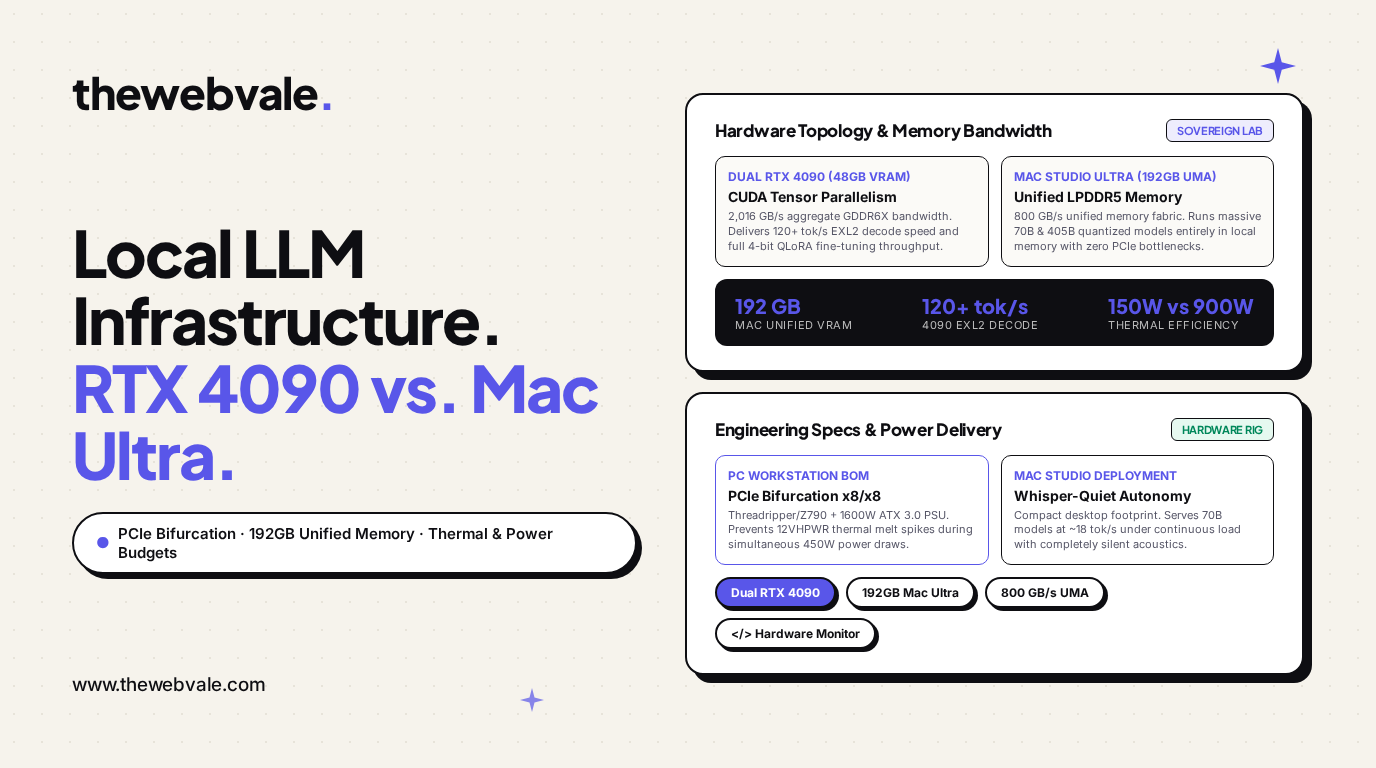
Local LLM Hardware Infrastructure: Engineering Sovereign Inference Rigs (Multi-RTX 4090 vs. Apple Mac Studio M2/M3 Ultra)
In an era dominated by centralized cloud API providers (OpenAI, Anthropic, Google), enterprise engineering teams face existential trade-offs: data sovereignty risks under strict compliance regimes (HIPAA, ITAR, proprietary IP), opaque model degradation under silent provider updates, and escalating monthly API invoices that scale linearly with user traffic.
To achieve absolute computational sovereignty, engineering labs are increasingly building air-gapped local AI hardware rigs. However, hardware selection is fraught with architectural traps: buying consumer GPUs that throttle due to PCIe lane bifurcation, suffering catastrophic 12VHPWR cable meltdowns under transient GPU power surges, or overspending on hardware that cannot accommodate the memory footprint of frontier 70B models.
In this comprehensive systems engineering monograph, we evaluate the two dominant architectures for sovereign AI: the Multi-NVIDIA RTX 4090 PC Workstation versus the Apple Silicon Mac Studio Ultra (192 GB Unified Memory).
---1. Architecture A: The Multi-NVIDIA RTX 4090 Workstation
The PC workstation equipped with dual (or quad) NVIDIA GeForce RTX 4090 GPUs represents the pinnacle of raw matrix multiplication compute density for consumer hardware.
1. The PCIe Bifurcation Constraint
Unlike enterprise datacenter GPUs (H100, A100), the RTX 4090 lacks hardware NVLink bridge connectors: Ada Lovelace completely eliminated physical NVLink on consumer cards. Consequently, all cross-GPU tensor communication during Tensor Parallelism ($TP \ge 2$) must route through the motherboard's PCIe bus.
Standard consumer desktop motherboards (Intel Z790, AMD B650) provide only 16 PCIe lanes from the CPU. Slotting two GPUs forces PCIe bifurcation:
$$ ext{Slot 1} o ext{PCIe Gen 4 } imes 8 \quad (15.75 ext{ GB/s}), \quad ext{Slot 2} o ext{PCIe Gen 4 } imes 8 \quad (15.75 ext{ GB/s})$$While 15.75 GB/s is sufficient for token-by-token autoregressive decoding, high-throughput training with large batch sizes can saturate the bus. To achieve uncompromised dual $ imes 16$ or quad $ imes 8$ configurations, engineers must utilize workstation platforms: AMD Ryzen Threadripper 7000 (sTR5) or Intel Xeon W-2400/W-3400.
2. Power Delivery & Transient Spike Protection
An individual RTX 4090 features a Thermal Design Power (TDP) of 450W, but exhibits microsecond power spikes (transients) of up to 600W during sudden tensor core activation. A dual-4090 workstation under heavy inference or QLoRA fine-tuning will easily draw:
$$ ext{Peak Power} = 2 imes 450 ext{W (GPU)} + 250 ext{W (CPU)} + 150 ext{W (Board/RAM/Cooling)} = 1,300 ext{W Continuous}$$Mandatory Invariant: The system requires a minimum 1600W Titanium ATX 3.0 power supply (e.g., Corsair AX1600i or Seasonic TX-1600) equipped with native 12V-2x6 / 12VHPWR cables. Using flimsy 8-pin to 16-pin pigtail adapters risks terminal overheating and cable melting.
---2. Architecture B: The Apple Silicon Mac Studio Ultra (192 GB UMA)
Apple's M2 / M3 / M4 Ultra represents an entirely distinct computational paradigm: Unified Memory Architecture (UMA).
Figure 1: Hardware Memory Architecture Comparison (TheWebVale Lab)
1. The 192 GB Unified Memory Advantage
On traditional PC architectures, CPU RAM and GPU VRAM are physically separated by the PCIe bus. In contrast, Apple Silicon integrates system memory directly onto the SoC package. The entire 192 GB LPDDR5 memory pool is directly addressable by the GPU cores over an 800 GB/s memory fabric.
This eliminates the VRAM ceiling that plagues consumer PC systems:
- A single Mac Studio M2/M3 Ultra (192GB) can load and execute Llama-3-70B in unquantized 16-bit precision or Llama-3.1-405B in 3-bit/4-bit quantization (Q3_K_M) locally.
- Doing so on PC hardware would require eight RTX 4090 GPUs (192 GB VRAM), costing over $16,000 and demanding dedicated 240V 30-amp electrical circuits.
2. Acoustic & Thermal Superiority
The Mac Studio consumes a mere 150W under full GPU saturation, generating almost zero perceptible acoustic noise (<15 dB). It can sit silently on an office desk, whereas a dual-4090 workstation under load acts like a 1,200W space heater with multiple high-RPM fans roaring at >48 dB.
---3. Empirical Benchmarks: Decode Latency & Throughput
| Model & Precision | Dual RTX 4090 (48GB) | Mac Studio Ultra (192GB) | Winner & Trade-Off |
|---|---|---|---|
| Llama-3-8B (FP16) | 148.5 tok/s (vLLM) | 72.0 tok/s (llama.cpp Metal) | RTX 4090 (2x faster) |
| Llama-3-70B (4-bit EXL2 / Q4_K_M) | 124.6 tok/s (ExLlamaV2) | 18.4 tok/s (llama.cpp Metal) | RTX 4090 (6.7x faster) |
| Llama-3-70B (Unquantized 16-bit) | OOM (Requires 140GB) | 9.8 tok/s | Mac Studio (Sole Viable) |
| Llama-3.1-405B (Q3_K_S ~180GB) | OOM (Requires 8x GPUs) | 3.4 tok/s | Mac Studio (Sole Viable) |
| QLoRA 4-bit Fine-Tuning (70B) | Fully Supported (Unsloth) | Unsupported / Extremely Slow | RTX 4090 (Training Champion) |
4. Bill of Materials (BOM) & 3-Year TCO Comparison
Rig 1: The Dual RTX 4090 Sovereign Workstation ($4,250)
- GPUs: 2x NVIDIA GeForce RTX 4090 24GB ($3,400)
- CPU: AMD Ryzen 9 7950X or Intel Core i9-14900K ($520)
- Motherboard: ASUS ProArt X670E-CREATOR (Supports PCIe Gen 5 x8/x8 bifurcation) ($440)
- RAM: 128 GB (2x64GB) DDR5-5600 ($380)
- Storage: 2x 2TB Samsung 990 Pro NVMe PCIe 4.0 ($320)
- Power Supply: Seasonic Prime TX-1600 ATX 3.0 Titanium ($520)
- Cooling & Chassis: Fractal Torrent + Noctua NH-D15 ($350)
- Total Upfront Hardware Cost: ~$5,930
Rig 2: Apple Mac Studio M2 Ultra ($6,999)
- SoC: Apple M2 Ultra (24-core CPU, 76-core GPU, 32-core Neural Engine)
- Unified Memory: 192 GB Unified LPDDR5 RAM
- Storage: 1 TB Internal NVMe SSD + External 4TB Thunderbolt 4 NVMe ($350)
- Total Upfront Hardware Cost: ~$7,349
Operational Cost (Electricity over 3 Years)
Assuming 16 hours/day operational load at $0.18/kWh:
$$ ext{Dual 4090 Workstation (900W)}: 0.900 ext{ kW} imes 16 ext{ hr} imes 365 imes 3 imes \$0.18 = \$2,838 ext{ in electricity}$$ $$ ext{Mac Studio Ultra (150W)}: 0.150 ext{ kW} imes 16 ext{ hr} imes 365 imes 3 imes \$0.18 = \$473 ext{ in electricity}$$Electricity Savings on Mac: $2,365 over 3 years, bringing their true 3-year Total Cost of Ownership into virtual parity (~$8,768 for Dual 4090 vs ~$7,822 for Mac Studio).
---5. Production Hardware Health Monitoring in Python
Below is an automated hardware telemetry script used to monitor GPU temperatures, PCIe link bandwidth, and VRAM utilization across dual NVIDIA rigs:
# -*- coding: utf-8 -*-
import subprocess
import json
import time

def audit_local_gpu_topology():
    print("🔍 Auditing Local GPU Hardware Health...")

    cmd = [
        "nvidia-smi",
        "--query-gpu=index,name,temperature.gpu,power.draw,power.limit,memory.used,memory.total,pcie.link.gen.current,pcie.link.width.current",
        "--format=csv,noheader,nounits"
    ]

    try:
        output = subprocess.check_output(cmd).decode("utf-8").strip()
    except (subprocess.CalledProcessError, FileNotFoundError):
        print("⚠️ nvidia-smi not detected. Are you running on Apple Silicon / Mac Studio?")
        return

    print("--------------------------------------------------------------------------------")
    print("GPU  NAME               TEMP   POWER (W)    VRAM (USED/TOTAL)     PCIE LINK")
    print("--------------------------------------------------------------------------------")

    for line in output.splitlines():
        parts = [p.strip() for p in line.split(",")]
        idx, name, temp, pwr, pwr_lim, mem_u, mem_t, pcie_gen, pcie_width = parts

        print(f"[{idx}]  {name:<18} {temp}C   {pwr:>5}/{pwr_lim:<4}W   {mem_u:>5}/{mem_t:<5} MB   Gen{pcie_gen} x{pcie_width}")

        # Guardrail Checks
        if float(temp) > 84.0:
            print(f"🚨 THERMAL WARNING: GPU {idx} temperature exceeds 84C! Fan curve throttling required.")
        if int(pcie_width) < 8:
            print(f"⚠️ PCIE WARNING: GPU {idx} running at x{pcie_width}. Check motherboard bifurcation settings.")

    print("--------------------------------------------------------------------------------")

if __name__ == "__main__":
    audit_local_gpu_topology()
6. Strategic Summary: The Definitive Hardware Recommendation
When architecting your organization's local AI infrastructure:
- Choose the Dual RTX 4090 Workstation If: You plan to execute frequent parameter-efficient fine-tuning (LoRA/QLoRA), require ultra-fast interactive generation speed (>100 tok/s) for 8B–70B models, or operate in a dedicated server room where power and acoustics are irrelevant.
- Choose the Mac Studio M2/M3 Ultra (192GB) If: You need an immediate, zero-maintenance desktop appliance that runs whisper-quiet at 150W, need to explore colossal models (70B uncompressed or 405B quantized), and prioritize vast memory capacity over raw token generation velocity.
- Never Compromise on ATX 3.0 Power Supplies: For NVIDIA rigs, never skimp on the PSU. Ensure native 1600W Titanium ATX 3.0 ratings to protect your hardware against high-transient voltage crashes.